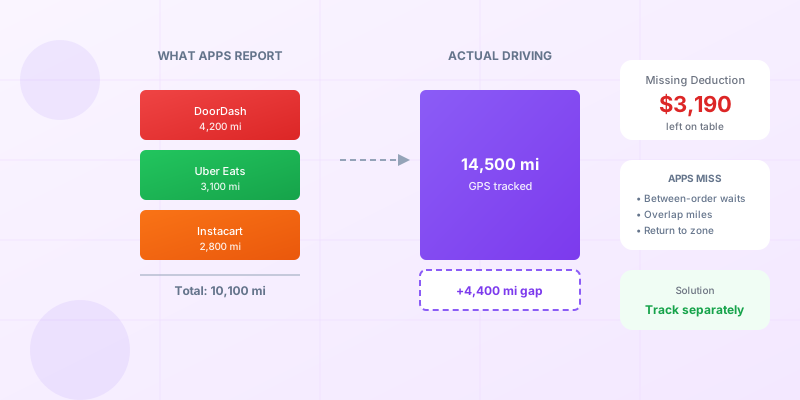

Say you run three delivery apps on a typical Saturday shift. DoorDash, Uber Eats, and Instacart all pinging at once. You take a DoorDash order, then an Uber Eats order along the way, then finish with an Instacart batch.
At the end of the year, you get three separate mileage summaries:
- DoorDash: 4,200 miles
- Uber Eats: 3,100 miles
- Instacart: 2,800 miles
Total: 10,100 miles.
Your actual driving? 14,500 miles.
That 4,400-mile gap isn’t because you’re bad at math. It’s because multi-apping creates mileage scenarios that no single app can track correctly.
If you’re running multiple delivery apps simultaneously, your mileage is more complicated than you think. Here’s how to get it right.
The Multi-App Problem: Which App “Owns” the Miles?
When you’re online with multiple apps at once, tracking gets messy.
Scenario: You’re parked at a shopping center with DoorDash, Uber Eats, and Instacart all open. An Uber Eats order pings. You accept it and drive 3 miles to the restaurant. Before you arrive, a DoorDash order comes in for a restaurant next door. You accept that too. You pick up both orders and deliver them.
Which app tracks those first 3 miles?
- DoorDash starts tracking after you accept their order (at the restaurant)
- Uber Eats tracks from acceptance to delivery (just their order)
- Instacart was open but you didn’t take an order
None of them captured the full picture. You drove 3 miles to the zone before accepting anything. That’s business mileage that nobody logged.
The IRS Doesn’t Care About App Names
Here’s the thing the apps don’t tell you: The IRS doesn’t care which platform you’re working for during any given mile.
Their standard is simple: Was the driving for business purposes?
If you’re driving to position yourself for delivery work—regardless of which app eventually pays you—that’s deductible business mileage. The fact that you were “fishing” on three apps simultaneously doesn’t change anything.
The IRS doesn’t require you to allocate miles to specific platforms. They require you to track:
- Date
- Destination
- Business purpose
- Miles driven
Your business purpose can be “delivery driving” or “gig work.” You don’t need to prove which app the miles were “for.”
What Multi-App Miles Get Missed
When you’re running multiple apps, several categories of miles fall through the cracks:
1. Driving to your zone
You leave home and drive 8 miles to a busy restaurant area. You’re online with all three apps. DoorDash thinks your shift starts when you accept your first DoorDash order. Same with Uber Eats and Instacart.
Those 8 miles? Nobody tracked them.
2. Repositioning between apps
You finish an Instacart delivery. Uber Eats shows surge pricing in a neighborhood 4 miles away. You drive toward the surge, but a DoorDash order pings first. You take it.
- Instacart tracked: 0 miles (delivery was done)
- Uber Eats tracked: 0 miles (you never accepted an order)
- DoorDash tracked: Starting from acceptance point
The 4 miles of repositioning? Uncounted.
3. Declining orders while moving
You’re driving toward a restaurant for Uber Eats. A DoorDash order comes in for a restaurant in the opposite direction. You decline. You keep driving toward the Uber Eats pickup.
Uber Eats counts this. But what about when you decline an Uber Eats order to take a DoorDash order? Each app only sees its own accepted orders.
4. Waiting with multiple apps open
You’re parked in a lot with all apps active. You move to a different spot. You drive to a gas station to use the bathroom. You reposition to a better waiting area.
All of this is business mileage. None of the apps track it.
5. Stacking deliveries across platforms
You accept an order from DoorDash and Uber Eats simultaneously. You pick up both, then deliver both. Each app tracks its own leg, but the overlap creates confusion.
Did both apps track the drive to the first restaurant? Probably. That’s potential double-counting. Did either app track the connecting drive between your two deliveries? Maybe not correctly.
How to Track Multi-App Miles Correctly
The solution is simple: Use a third-party tracker that doesn’t care which app you’re working for.
A standalone mileage app tracks every mile you drive. It doesn’t know or care about DoorDash or Uber Eats. It just records trips with GPS coordinates and timestamps.
At the end of the day, you have one complete log. You classify shifts as “delivery work” regardless of which apps were involved.
Setup:
- Download a mileage tracking app (Stride, MileIQ, OdoAlibi, etc.)
- Set it to track automatically
- Start the app before your shift
- Drive normally with whatever apps you want
- At the end of the shift, all miles are logged as one business session
At tax time, you export a single report. You don’t need to reconcile three different app summaries.
Documentation That Survives an Audit
If you get audited on your mileage deduction as a multi-app driver, here’s what you need:
What the IRS wants to see:
- A contemporaneous mileage log (recorded at the time of driving)
- Date, destination, business purpose, and miles for each trip
- Total business miles vs. total personal miles
What actually protects you:
A GPS-verified log from a tracking app is nearly bulletproof. It shows exactly when you drove, where you went, and how far. Auditors understand that gig workers use multiple platforms.
If questioned, you explain: “I work for multiple delivery platforms simultaneously. This log tracks all my business driving. The individual app summaries are incomplete because they only track active deliveries, not positioning or waiting.”
That’s a reasonable, defensible position.
What gets you in trouble:
- Adding up three app summaries and claiming the total (likely double-counts overlapping trips)
- Having no log and trying to reconstruct from app data alone
- Claiming mileage that doesn’t match your actual driving patterns
The Double-Counting Trap
Multi-appers sometimes make a dangerous mistake: They add up all the mileage summaries from their apps and claim the total.
This seems logical, but it’s wrong.
If you accept a DoorDash order and an Uber Eats order simultaneously, both apps might track overlapping miles. Maybe you drove 2 miles with both deliveries in your car. Both apps might count those miles.
Claiming 4 miles when you only drove 2 is the kind of thing that raises audit flags.
This is why third-party tracking matters. One app, one log, one accurate total.
What a Multi-App Audit Looks Like
The following is a typical scenario based on common audit outcomes. Details are illustrative.
Say you’re a full-time multi-app driver. You’ve been running DoorDash, Uber Eats, and Grubhub for three years. You’ve tracked your mileage using a dedicated app from day one—not because you expected an audit, but because your accountant told you to.
In year three, the IRS sends a letter questioning your $8,200 mileage deduction (about 11,300 miles at the then-current rate).
You respond with:
- Your complete mileage log from your tracking app—every trip, GPS-verified, timestamped
- Your app summaries from DoorDash, Uber Eats, and Grubhub (totaling about 8,000 miles between them)
- A letter explaining that app summaries only track active deliveries, while your log captured all business driving including positioning and waiting
The IRS accepts your documentation. Case closed in six weeks.
The key: You didn’t rely on the incomplete app data. You had your own complete records.
How the Apps Actually Track Miles
Understanding what each app tracks helps you see the gaps:
DoorDash: Tracks from order acceptance to delivery completion. Nothing before acceptance. Nothing after completion. (See our full breakdown of what DoorDash mileage tracking actually misses.)
Uber Eats: Similar to DoorDash. Tracks active delivery miles only. Surge chasing and repositioning don’t count.
Instacart: Tracks from store arrival to delivery. The drive to the store often doesn’t count until you “start shopping.”
Grubhub: Tracks from restaurant to customer. Positioning and waiting are excluded.
Spark (Walmart): Similar limitations. Active delivery only.
Every app has its own definition of “your miles.” None of them match the IRS definition of “business miles.”
The Practical Approach
Here’s what I recommend for any multi-app driver:
Daily:
- Run your tracking app the entire time you’re working (or set it to auto-detect)
- Don’t worry about which platform you’re logged into
Weekly:
- Review your tracked trips and classify as business or personal
- Delete any personal trips that got accidentally logged
Quarterly:
- Export your mileage data as a backup
- Compare your tracked total to your app summaries (expect a 30-40% gap)
At tax time:
- Use your tracking app’s total for your mileage deduction
- Keep the app summaries as supporting documentation
- File your Schedule C with accurate mileage
What About Mileage By Platform?
You might wonder: Do I need to track which miles were for DoorDash versus Uber Eats?
No. The IRS doesn’t care about platform-by-platform breakdowns.
You’re a self-employed delivery driver. All business miles go on one Schedule C. Whether you earned $100 from DoorDash or $100 from Uber Eats, the mileage deduction is calculated the same way.
The only reason to track by platform is for your own analysis (which app pays better per mile, etc.). It’s not a tax requirement.
Start Tracking the Right Way
If you’re multi-apping without a dedicated mileage tracker, you’re leaving money on the table and creating audit risk.
The fix takes five minutes:
- Download a tracking app
- Grant location permissions
- Start your next shift
Every mile will be logged, regardless of which platform you’re working for.
At tax time, you’ll have one clean report instead of three incomplete summaries you’re trying to reconcile.
Your deductions will be accurate. Your audit protection will be solid. And you’ll stop wondering which app is supposed to track which miles.
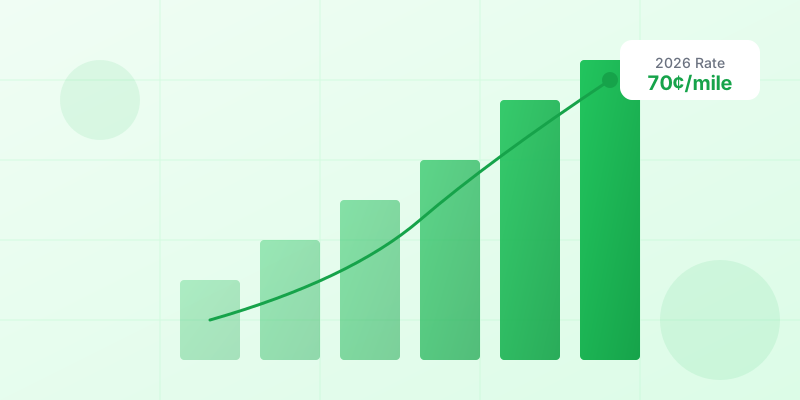
Because the answer is: None of them. Track it yourself with an automatic mileage tracking app. Use our mileage deduction calculator to see what those missing miles are worth at the 2026 IRS mileage rate.
And make sure you understand the commute rules for your first and last trip of the day—with a home office, those miles are deductible too.