
You download a mileage tracking app. It says “free.” You start logging trips. Everything seems great.
Then mid-March — right when you need your records for tax season — you hit the trip limit. The app locks your data behind a paywall. Now you’re scrambling, and “free” just cost you time, stress, and possibly missed deductions.
This is the most common story in mileage tracking. Here’s what’s actually going on with free apps so you can make the right call.
What Free Tiers Actually Give You
Most mileage tracking apps offer a free plan. But “free” means very different things depending on the app.
Here’s what you’ll typically find:
Trip limits. The most common restriction. Many free plans cap you at 20–40 trips per month. That sounds fine until you realize a full-time gig worker might log 20 trips in a single day. Even a real estate agent doing 3–4 showings daily will blow past the cap within a week.
Manual logging only. Some free tiers disable automatic tracking — the feature that makes these apps actually useful. You get a trip logger, but you have to start and stop it manually. Miss one trip and it’s gone. This is essentially a digital version of a paper notebook.
No reports or exports. Free plans often let you record trips but won’t let you generate the IRS-ready reports you need at tax time. You can see your data in the app, but you can’t get it out in a useful format without upgrading.
Ads everywhere. Some free apps monetize through advertising. Pop-ups before you can log a trip. Banner ads on your dashboard. It slows you down and makes the app frustrating to use daily.
Limited categories. You might only be able to tag trips as “business” — no sub-categories for different clients, projects, or purposes. This makes organizing your records at tax time much harder.
What Happens When You Hit the Trip Limit
This is where free apps cause real problems.
Most apps handle the trip limit one of three ways:
1. Hard cutoff. You hit the limit and the app stops recording. No warning, no grace period. You open the app on trip 41 and it tells you to upgrade. Any trips you take after that are simply not logged.
2. Soft lock. The app keeps recording, but you can’t access the data until you pay. Your trips are held hostage. You know they’re there, but you can’t see them, export them, or use them.
3. Downgrade. Automatic tracking switches off and you’re moved to manual-only mode. The app still works, but you lose the feature that was doing all the heavy lifting.
All three scenarios hit hardest during Q1 tax season, exactly when you need your records most. If you’ve been tracking all year on a free plan with a monthly limit, you might have January and February covered — but if you hit the cap in March while preparing your return, you’re stuck.
Features Reserved for Paid Plans
Beyond trip limits, here’s what free users typically miss out on:
Automatic trip detection. The app uses your phone’s GPS and motion sensors to detect when you’re driving and logs the trip without you touching anything. This is the core value of a mileage tracking app. Without it, you’re doing manual work.
IRS-compliant reports. Generating a mileage log that includes date, destination, business purpose, and distance — formatted the way the IRS expects — is usually a paid feature. Free plans might give you a list of trips, but not the mileage log the IRS actually wants.
Duplicate trip detection. Paid plans often catch trips you accidentally logged twice. Free plans let duplicates pile up, which could inflate your deduction and create audit problems.
Team features. If you’re tracking mileage for a business with employees, free plans won’t cover you. Admin dashboards, approval workflows, and reimbursement policy tools are always paid.
Multi-vehicle tracking. If you drive more than one car for business, switching between vehicles in the app is usually a premium feature.
Customer support. Free tier? You get a FAQ page. Paid? You get actual humans who can help when something goes wrong.
When Free Is Truly Enough
Free plans aren’t always a bad deal. Here are the situations where free genuinely works:
You drive fewer than 20 business trips per month. If you’re a part-time freelancer, occasional consultant, or someone who drives for work sporadically, a 20–40 trip monthly limit might never become an issue. You stay within the cap, you get your records, you’re done.
You only need basic logging. If you’re already organized and just need a digital record — date, distance, purpose — a free app with manual entry might be all you need. Some people prefer the simplicity.
You’re testing before committing. Starting with a free plan to see if an app fits your workflow is smart. Try it for a month. See if the tracking is accurate. Check if it works with your phone. Then decide whether to upgrade.
Your deduction is small. If you’re claiming under $500 in mileage deductions per year, paying $60–$100 for a tracking app doesn’t make financial sense. A free plan or even a spreadsheet will do.
When Upgrading Makes Financial Sense
Here’s the math most people don’t do.
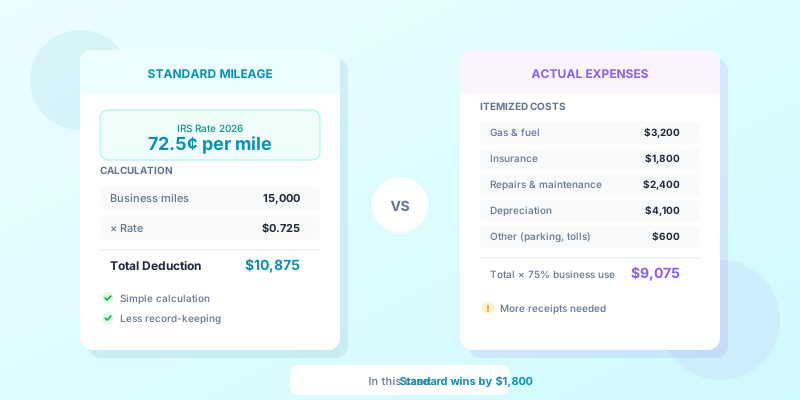
The 2026 IRS mileage rate is 72.5 cents per mile. Every mile you miss tracking is 72.5 cents in lost deductions.
The break-even calculation:
A typical paid mileage app costs $5–$10 per month, or $60–$120 per year.
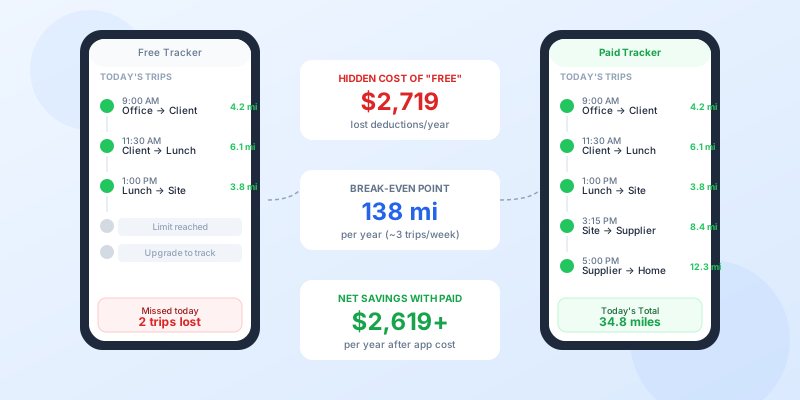
At 72.5 cents per mile, you need to recover just 83–166 additional miles per year to cover the cost of a paid app. That’s less than one extra trip per week for most people.
If you’re a gig worker missing even 15% of your trips because your free app doesn’t auto-track, you’re losing far more than $120 per year.
Example: Full-time delivery driver
- Drives 25,000 business miles per year
- Free app misses 15% due to manual logging gaps = 3,750 miles lost
- Lost deduction: 3,750 × $0.725 = $2,718.75
- Cost of paid app: ~$100/year
- Net gain from upgrading: $2,618.75
Example: Part-time real estate agent
- Drives 8,000 business miles per year
- Free app captures everything but requires 10 minutes daily of manual work
- That’s 60+ hours per year spent logging trips
- Even valuing your time at $20/hour, that’s $1,200 in hidden costs
The paid app almost always pays for itself. The question is how fast.
The Hidden Costs of “Free”
Free apps cost you in ways that don’t show up on a price tag.
Your time. Manual logging takes time. Every trip you have to start, stop, categorize, and annotate manually is time you could spend working. Over a year, it adds up to dozens of hours.
Your data. Some free apps sell anonymized location data to third parties. Your driving patterns, the businesses you visit, your daily schedule — all of it has value to data brokers and advertisers. Read the privacy policy. If the app is free and doesn’t show ads, ask yourself how they’re making money.
Your accuracy. Manual tracking is inherently less accurate than automatic tracking. You’ll forget trips. You’ll estimate distances. You’ll skip logging when you’re busy. Come tax time, your records have gaps — and gaps mean lost deductions or audit risk.
Your stress. The mental overhead of remembering to log every trip, every day, is a hidden cost. Automatic tracking eliminates that entirely. You drive. The app records. You review once a week.
Your audit protection. If you’re ever audited, “I used a free app that didn’t track everything” is not a strong position. Complete, automatic, GPS-verified records are significantly more defensible than partial manual logs.
Best Free Option by Use Case
Not everyone has the same needs. Here’s how to think about it:
Occasional business driver (under 20 trips/month): A free plan with manual logging can work fine. You won’t hit the trip limit, and the small number of trips makes manual entry manageable. Just make sure the app lets you export your data at tax time.
Regular freelancer or consultant (20–60 trips/month): You’ll outgrow most free plans quickly. Start with a free trial to test the app, then budget for a paid plan. The automatic tracking alone will save you hours per month.
Full-time gig or delivery driver (100+ trips/month): Free plans are not designed for you. You need automatic tracking, unlimited trips, and solid reporting. A paid plan at $8–$10/month is a business expense — and it’s deductible. You’ll recoup the cost many times over in captured miles. If you’re running multiple delivery apps, accurate tracking is even more critical.
Small business owner tracking a team: Free plans don’t support team features. You’ll need a paid business plan from day one. Look for one that includes admin controls, approval workflows, and IRS-compliant reporting.
The Question to Ask Yourself
Before choosing a free plan, answer this:
How much is one missed trip worth to you?
If you drive 30 miles to a client meeting and forget to log it, that’s $21.75 in lost deductions. Do that once a week for a year and you’ve lost over $1,100.
A paid automatic mileage tracking app captures that trip without you thinking about it.
Free is great when it’s genuinely free. But when “free” means lost deductions, wasted time, and weaker audit protection, it’s the most expensive option on the table.
What You Should Do
1. Audit your current tracking. How many trips are you logging per month? How many are you missing? If you don’t know, that’s the problem.
2. Run the break-even math. Take the cost of a paid app. Divide by $0.725. That’s how many missed miles it takes to make upgrading worthwhile. For most people, it’s shockingly few.
3. Read the privacy policy. If your current app is free and ad-free, find out what they’re doing with your data.
4. Try before you buy. Most paid apps offer a free trial. Use it for a full month during a normal work period. Compare the trips it captures automatically against what you would have logged manually.
5. Remember: the app is deductible. If you use a mileage tracking app for business, the subscription cost is a deductible business expense. The real cost is even lower than the sticker price.
The Bottom Line
Free mileage tracking apps work for people who barely drive for business. For everyone else, they create a false sense of security — you think you’re tracking, but you’re leaving money on the table.
The math is simple: if you drive more than a few hundred business miles per year, a paid app pays for itself. If you drive thousands of miles, free is actively costing you money.
Don’t let a $0 price tag cost you thousands in missed deductions. Run the numbers with our mileage deduction calculator, see what you’re actually leaving on the table, and make the call that makes financial sense — not just the one that feels free.
If you’re not ready for an app yet, start with our free mileage log template — it’s a compliant spreadsheet-style log with CSV export, no signup required. Canadian drivers can also use our CRA mileage log template with built-in odometer tracking and business-use percentage calculation.