
You tracked your miles all year. You’re pretty sure your records are “fine.” Then you get an audit notice, and suddenly you’re staring at your spreadsheet wondering if “drove to client” is specific enough.
It’s not.
The IRS has clear rules about what a mileage log must contain. Most people don’t follow them—not because they’re cheating, but because nobody ever showed them what a good log looks like.
Let’s fix that.
The Four Required Elements
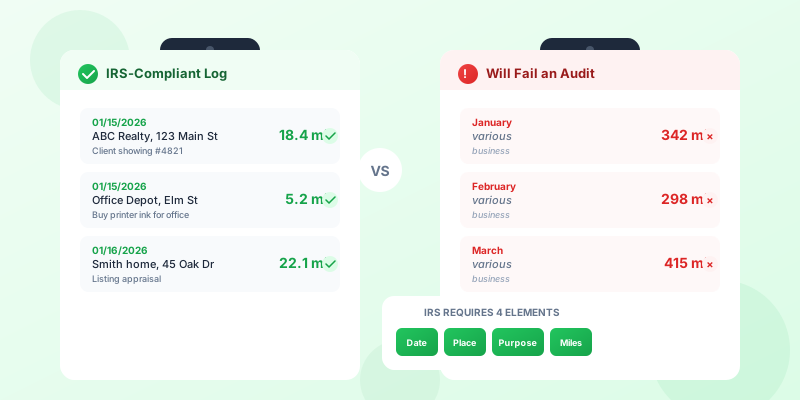
Every single trip in your mileage log needs four things. Not three. Not “most of the time.” Every trip.
1. Date of the trip The specific day. Not “January” or “week of 1/15.” The actual date.
2. Destination Where you went. A name and address, or at minimum a name and city. “Client meeting” is not a destination. “ABC Realty, 123 Main St, Austin” is.
3. Business purpose Why you drove there. This needs to be specific enough that someone who doesn’t know you could understand why the trip was business-related. “Business” doesn’t cut it. “Listing presentation for 45 Oak Dr” does.
4. Miles driven The distance for that specific trip. Not your total for the day. Not an estimate of “about 20 miles.” The actual mileage, trip by trip.
These requirements come from IRS Publication 463 and IRC Section 274(d). They’re not suggestions.
What “Contemporaneous” Really Means
You’ve probably heard that the IRS wants “contemporaneous” records. This is the word that scares people.
Here’s what it actually means: You recorded the information at or near the time of the trip.
It doesn’t mean you need to pull over and write in a logbook the second you park. It means:
- Logging trips the same day = ideal
- Logging trips at the end of each week = acceptable
- Reconstructing the entire year in March from memory = not contemporaneous
The IRS doesn’t expect perfection. They expect a pattern of regular recording. If your log shows entries dated throughout the year with consistent detail, that’s contemporaneous. If your log looks like it was all written at once with suspiciously round numbers and identical descriptions, it’s not.
An automatic mileage tracking app solves this problem entirely—trips are recorded with GPS timestamps as they happen.
Good Log vs. Bad Log: Side by Side
This is where most guides fail you. They list the rules but never show you what passing and failing actually looks like. Here’s the difference.
The Good Log
| Date | Destination | Business Purpose | Miles |
|---|---|---|---|
| 01/15/26 | ABC Realty, 123 Main St, Austin | Listing presentation for 45 Oak Dr | 18.4 |
| 01/15/26 | Office Depot, 890 Elm St, Austin | Purchase printer ink for client packets | 5.2 |
| 01/16/26 | Smith residence, 45 Oak Dr, Round Rock | Pre-listing appraisal walkthrough | 22.1 |
| 01/17/26 | Rodriguez CPA, 200 7th Ave, Austin | Quarterly tax planning meeting | 12.7 |
| 01/17/26 | Home Depot, I-35 & Parmer | Buy staging supplies for 45 Oak listing | 8.3 |
Why this works:
- Specific dates — individual entries per trip, not batched
- Real destinations — names and addresses, not vague references
- Clear purpose — anyone can see why each trip was business-related
- Precise mileage — decimal points suggest actual measurement, not estimation
The Bad Log
| Date | Destination | Business Purpose | Miles |
|---|---|---|---|
| January | Various | Business | 342 |
| February | Various | Business | 298 |
| March | Various | Business | 415 |
| April | Various | Business | 367 |
Why this fails:
- Monthly totals — no individual trip records
- No destinations — “various” tells the IRS nothing
- Generic purpose — “business” is not a business purpose
- Round-ish numbers — suggests estimation after the fact
- Clearly reconstructed — no auditor will believe you tracked daily and produced this
The “Almost Good Enough” Log
There’s a middle ground that trips people up:
| Date | Destination | Business Purpose | Miles |
|---|---|---|---|
| 01/15/26 | Client meeting | Meeting | 20 |
| 01/16/26 | Client meeting | Meeting | 20 |
| 01/17/26 | Office | Supplies | 10 |
This is better than the bad log but still has problems:
- “Client meeting” isn’t a destination—which client? Where?
- “Meeting” isn’t a purpose—what meeting? About what?
- Round numbers every time signal estimation
- Identical entries suggest copy-paste, not real tracking
The Annual Odometer Reading Requirement
Here’s one most people miss entirely.
The IRS wants you to record the odometer reading of each vehicle at the beginning and end of the tax year. This is how they verify your total annual mileage and calculate your business-use percentage.
What to record:
- January 1 odometer reading (or the day you start using the vehicle for business)
- December 31 odometer reading (or the day you stop using the vehicle)
How to do it:
- On January 1 (or close to it), take a photo of your odometer. Save it.
- On December 31, do the same.
- Store these photos with your tax records.
The math is simple:
- End-of-year odometer minus start-of-year odometer = total miles driven
- Total business miles from your log divided by total miles = business-use percentage
If your log claims 15,000 business miles but your odometer only shows 12,000 total miles for the year, you have a problem.
Screenshots and Photos That Support Your Log
A mileage log is your primary record. But supporting evidence makes it bulletproof.
Photos to keep:
- Odometer at year start and end (as above)
- Service receipts showing odometer readings at oil changes
- Parking receipts from business locations
Digital evidence:
- Calendar entries matching your logged trips
- Client emails or appointment confirmations
- GPS data from your mileage tracking app
- Google Maps Timeline (if enabled)
- Toll records
- Gas station receipts showing location
You don’t need all of these. But if you’re ever questioned on a specific trip, being able to pull up a calendar invite that says “Meeting with John Smith at ABC Realty, 2pm” alongside your mileage entry for that date is powerful.
What Auditors Actually Look At
IRS auditors reviewing mileage claims look for specific patterns. Knowing what they check helps you keep better records.
Red flags they spot immediately:
- Round numbers on every entry (20, 30, 50 miles — real trips end in decimals)
- Identical mileage for the same route every time (traffic, detours, and route changes cause variation)
- No trips on days you clearly worked (gaps suggest incomplete recording)
- Mileage that exceeds what’s reasonable for your type of work
- Total business miles that approach or exceed total vehicle miles
- A log that appears to be written all at once (same ink, same handwriting style throughout)
What they cross-reference:
- Your mileage log against your calendar
- Your claimed destinations against your client list
- Your total miles against your odometer and service records
- Your business-use percentage against industry norms
- Your deduction amount against your income (claiming $15,000 in mileage on $30,000 of income raises eyebrows)
What actually reassures them:
- Consistent detail level throughout the year
- Occasional non-round numbers (18.4 miles, not 20)
- Notes explaining unusual trips
- Digital records with timestamps
- A log that shows you missed some days (nobody drives for business 365 days a year)
A slightly messy, clearly real log beats a suspiciously perfect one.
Sample Mileage Log Template With Real Entries
Here’s a week of entries from a real estate agent’s log. Use this as a template for your own.
Vehicle: 2023 Toyota Camry Start-of-year odometer: 34,218
| Date | Start | Destination | Business Purpose | Miles |
|---|---|---|---|---|
| Mon 01/06/26 | Home office | Rivera home, 812 Cedar Ln, Pflugerville | Buyer showing — Rivera family, 3BR ranch | 16.3 |
| Mon 01/06/26 | 812 Cedar Ln | Pine Creek subdivision model home, Hutto | Buyer showing #2 — Rivera family | 11.8 |
| Mon 01/06/26 | Pine Creek | Home office | Return from showings | 19.4 |
| Tue 01/07/26 | Home office | Keller Williams office, 500 N Lamar, Austin | Team meeting, Q1 planning | 8.2 |
| Tue 01/07/26 | 500 N Lamar | FedEx, 2nd St & Congress | Ship signed contracts for 45 Oak Dr closing | 1.9 |
| Tue 01/07/26 | FedEx | Home office | Return | 9.1 |
| Wed 01/08/26 | — | — | No business driving (office day, WFH) | 0 |
| Thu 01/09/26 | Home office | 45 Oak Dr, Round Rock | Final walkthrough with buyer — closing 01/10 | 22.1 |
| Thu 01/09/26 | 45 Oak Dr | Home office | Return | 22.4 |
| Fri 01/10/26 | Home office | Capital Title, 1100 S MoPac, Austin | Closing — 45 Oak Dr, Rivera purchase | 14.6 |
| Fri 01/10/26 | Capital Title | Home office | Return from closing | 14.2 |
Weekly total: 140.0 miles
Notice what makes this work:
- Home office is listed as the starting point (qualifying home office established)
- Each destination has a name and address
- Purpose ties to specific clients and transactions
- Return trips are logged separately
- Wednesday shows zero miles — this is honest, not a gap
- Mileage varies slightly for the same routes (because real driving does)
Apps vs. Paper: What the IRS Prefers
This is a trick question, and the answer surprises people.
The IRS does not prefer one format over another.
Paper logs, spreadsheets, and apps are all acceptable. The IRS cares about the content of your records, not the medium.
That said, here’s the practical reality:
Paper logs:
- Pros: Simple, no technology needed, accepted by every auditor
- Cons: Easy to lose, hard to back up, more effort to maintain, no timestamps
Spreadsheets:
- Pros: Easy to organize and search, can calculate totals automatically
- Cons: No proof of when entries were made, easy to edit after the fact
Mileage tracking apps:
- Pros: GPS-verified routes, automatic timestamps proving contemporaneous recording, easy export for tax prep, hard to fabricate
- Cons: Battery drain, subscription cost, occasional missed trips
The real advantage of apps isn’t convenience — it’s proof of contemporaneous recording. Every trip logged by GPS has a timestamp that proves you recorded it when it happened. That’s the one thing paper logs and spreadsheets can’t provide.
If an auditor questions whether your log is contemporaneous, a paper log is your word against their skepticism. An app log has machine-generated timestamps.
If your app misses a trip, you can add it manually — just make sure to note that it’s a manual entry and add it promptly.
What to Do Right Now
If you already have a log: Check it against the four requirements. Does every entry have a specific date, named destination, clear purpose, and exact mileage? If not, start improving your entries today. You can’t fix past entries, but you can make every future entry audit-ready.
If you don’t have a log: Start one today. Even a simple spreadsheet works. Use the template above. The best log is the one you’ll actually maintain.
If you’ve been winging it: Don’t panic. If you need to recover past mileage records, there are legitimate ways to reconstruct your history. But going forward, set up a system that captures the four elements automatically.
Either way: Take a photo of your odometer today. Set a calendar reminder for December 31 to do it again. This takes 10 seconds and satisfies a requirement most people forget entirely.
The Bottom Line
The IRS mileage log isn’t complicated. It’s four things per trip: date, destination, purpose, miles. Record them as they happen. Take two odometer photos a year.
The people who lose mileage audits aren’t cheaters — they’re people who tracked “sort of” but not specifically enough. A vague log with the right totals still fails. A detailed log with slightly imperfect totals usually passes.
Be specific. Be consistent. Be contemporaneous.
That’s it. That’s the whole secret.
Use our mileage deduction calculator to see exactly what your tracked miles are worth at the 2026 IRS rate of 72.5 cents per mile. Need a quick log right now? Try our free mileage log template — add trips, calculate your deduction, and export as CSV. For automatic GPS tracking, OdoAlibi’s IRS mileage log records everything the IRS requires with zero manual entry.
And if you’ve received an IRS notice about your mileage, read our guide on responding to an IRS mileage inquiry before you do anything else.